





How To Rank In Microsoft Copilot: A Step-by-Step Guide


Sep 09, 2026

Contents
 19 min
- What is Microsoft Copilot?
- From Traditional Search to AI Search
- Why Does Ranking In Copilot Matter?
- Copilot vs. ChatGPT, Gemini, and Perplexity
- How Does Copilot Build An Answer?
- Traditional SEO vs. GEO: What's the Difference?
- See Copilot Search in Action
- How Does Copilot Choose Sources?
- What Makes Content Citable in Copilot?
- How to Improve Your Visibility in Microsoft Copilot
- Copilot Models: What Should You Optimize For?
- Copilot's External Influences
- What Not to Do
- Final Thoughts


Search is changing. Instead of typing a few keywords into Google or Bing and scanning a list of links, people can now ask AI tools to answer complete questions and get a summarized answer.
Microsoft Copilot is part of that shift.
For businesses, this creates a new visibility question: What happens when a potential customer asks Copilot to recommend a company, compare products, or explain a service?
Your website may not be the first result they see. Your brand may instead appear as a source, citation, recommendation, or part of an AI-generated answer.
This is where optimizing your content for Microsoft Copilot becomes important.
What is Microsoft Copilot?
“Microsoft Copilot” refers to several Microsoft AI experiences rather than one single product.
For search visibility, the most relevant experiences include Copilot on the web, Copilot Search in Bing, and Copilot experiences integrated into Microsoft products.
Microsoft 365 Copilot is different because it can also ground responses in information a user has permission to access within their organization's Microsoft 365 environment. Microsoft explains that Copilot can ground responses in work data, web information, and content supplied directly by the user.
However, Bing plays a central role in web-grounded Copilot experiences.
When web search is enabled, Copilot can turn a user's prompt into a Bing search query and use relevant web results to ground its response.
That means your Copilot strategy should start with a simple principle:
If Bing cannot discover and understand your content, Copilot has less web information available to reference.
From Traditional Search to AI Search
Traditional search is built around helping users find webpages. You enter a query, search engines evaluate available pages, and the results are presented as links that users can explore.
AI search changes what happens next.
Instead of making the user visit multiple pages and piece the information together, Copilot can retrieve relevant web information and use it to create a conversational response.
That does not mean traditional SEO is disappearing. Copilot's web-grounded experiences still depend on Microsoft's search infrastructure. Bing needs to discover, crawl, and index content before that content can be eligible for retrieval and grounding. Microsoft explicitly states that the same core crawling, indexing, and ranking foundation supports Bing, Copilot, and other AI-powered search experiences.
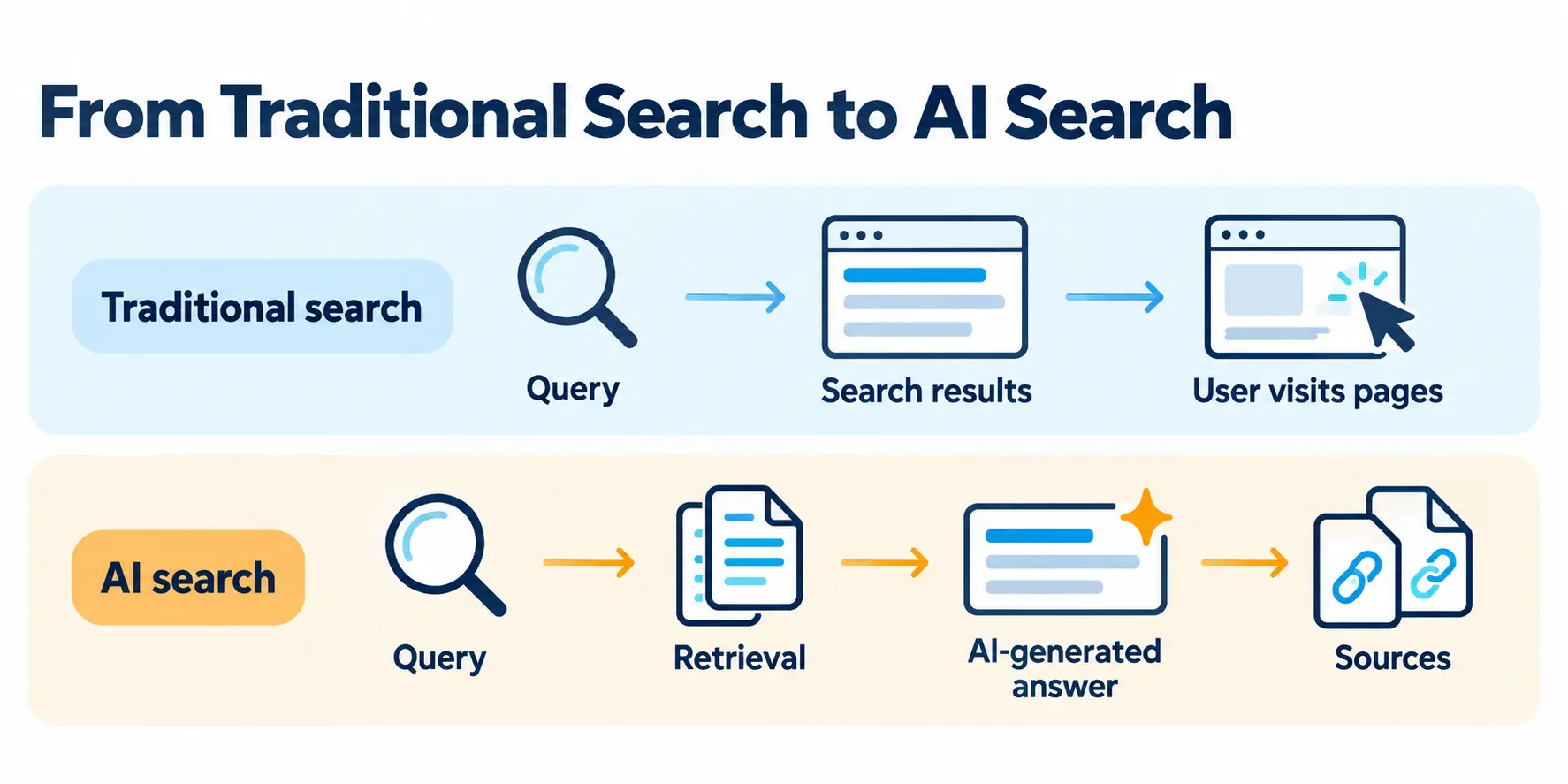
The major difference is the final step.
Traditional search: Query → Search results → User visits pages
AI search: Query → Retrieval → AI-generated answer → Sources
For businesses, this creates a second visibility opportunity. A page does not only need to compete for a position in search results. Its information may also need to be clear, relevant, and useful enough to become part of an AI-generated response.
This is why Copilot SEO works best alongside traditional SEO rather than replacing it.
Why Does Ranking In Copilot Matter?
Copilot is part of Microsoft's broader ecosystem, including web search, Bing, Edge, Windows, and Microsoft 365. Microsoft reported over 430 million paid Microsoft 365 commercial seats, reported in FY2025 Q3. That does not mean all 430 million users are using Copilot for web search, but it highlights the scale of the ecosystem in which Microsoft's AI tools operate.
The business adoption is also significant. In early November 2024, 70% of Fortune 500 companies had adopted Microsoft 365 Copilot. This figure does not measure public-web Copilot usage, but it shows why Microsoft's AI ecosystem is becoming increasingly relevant to businesses targeting enterprise audiences.
AI search also changes the buyer journey.
A customer might ask:
“What are the best digital marketing companies for Microsoft Copilot optimization?”
Instead of opening ten websites, the user may first read an AI-generated shortlist.
That makes brand visibility inside the answer itself valuable.
Kevin Indig found that users arriving from AI tools spent about a minute longer on websites than users from Google Search, with Copilot users showing particularly strong engagement in that study. This is third-party research, not a Microsoft performance statistic.
There is another practical reason to invest in Copilot Optimization: it does not require a completely separate SEO strategy. Many of the fundamentals overlap with modern SEO and broader AI search optimization, including technical accessibility, useful content, clear information architecture, search intent, credible sources, and consistent brand information.
In other words, optimizing for Copilot can strengthen your existing SEO efforts while preparing your brand for an increasingly AI-driven search experience.
Copilot vs. ChatGPT, Gemini, and Perplexity
Optimizing for Copilot is not exactly the same as optimizing for ChatGPT, Gemini, or Perplexity.
Each platform has its own search ecosystem, retrieval process, and way of presenting sources.
|
Engine |
Primary web/search ecosystem |
Typical citation format |
What generally helps visibility |
|
Microsoft Copilot |
Bing |
Numbered/source cards or source links, depending on experience |
Bing visibility + clear, citable content |
|
ChatGPT |
Model knowledge + web search when available |
Links, citations, and source references can vary by experience |
Cross-source visibility + strong, relevant content |
|
Gemini |
Google Search ecosystem |
Source/citation cards |
SEO + entity strength + authoritative sources |
|
Perplexity |
Its own retrieval/crawling and web sources |
Numbered inline citations |
Strong source coverage and citation-worthy content |
This table is a simplified SEO comparison, not a claim that each platform has one fixed backend.
For example, ChatGPT's web-connected experiences can use search, while its underlying model knowledge is separate from live web retrieval. Similarly, Copilot experiences can vary by product.
The important takeaway is this:
Do not assume that success in Google, ChatGPT, or another AI platform automatically means success in Copilot.
Copilot's close relationship with Microsoft's Bing search ecosystem makes Bing visibility especially important. SEO Alive similarly treats Copilot as a distinct GEO surface rather than simply another version of ChatGPT.
How Does Copilot Build An Answer?
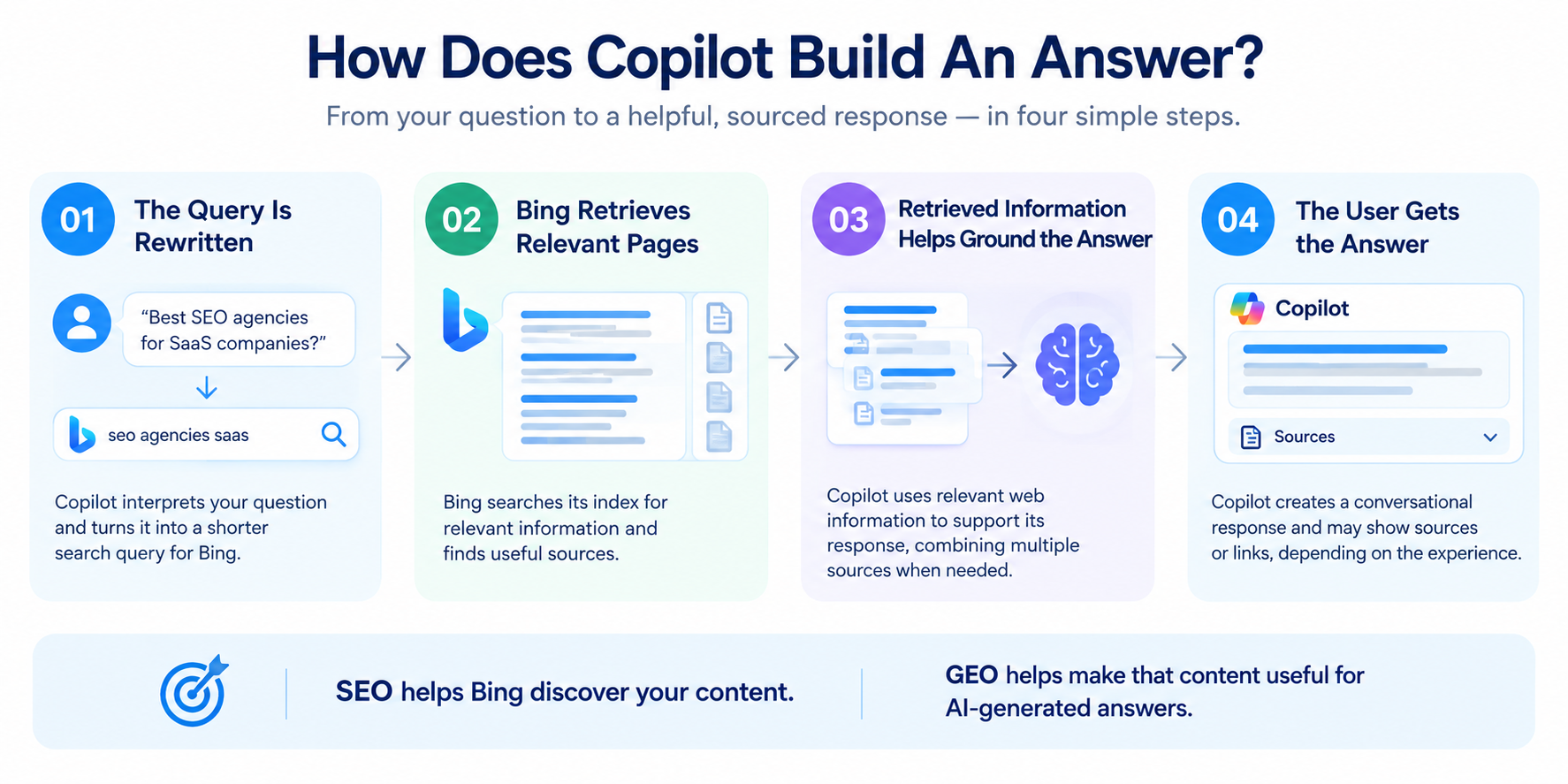
When Copilot uses web search, Microsoft says it can generate a search query from the user's prompt, send that query to Bing, and use relevant web results to enhance the response. The exact experience can vary depending on the Copilot product, settings, and whether web search is enabled.
01. The Query Is Rewritten
Copilot can interpret a user's question and turn it into a shorter search query for Bing.
Your content does not need to use the user's exact wording. It should clearly match the topic, intent, audience, and context behind the question.
02. Bing Retrieves Relevant Pages
Bing searches its index for relevant information.
If your content is not crawlable, indexed, or relevant, there is less opportunity for it to be retrieved for a web-grounded Copilot response.
Strong Bing visibility creates more opportunities for Copilot visibility.
03. Retrieved Information Helps Ground the Answer
Relevant information retrieved from the web can be used to support Copilot's response. Microsoft describes grounding as a way of connecting AI systems with current information from the web.
This makes clear, factual, well-structured content important.
04. The User Gets the Answer
Copilot uses the available information to create a conversational response. Depending on the experience, users may also see sources or links associated with the answer. Microsoft 365 Copilot's web-search experience, for example, provides a Sources option showing the query sent to Bing and the sources used.
The goal is not simply to “rank in Copilot.” It is to create content that is relevant, accessible, credible, and useful enough to be retrieved for questions related to your business.
SEO helps Bing discover your content. GEO focuses on how that content participates in AI-generated answers.
Traditional SEO vs. GEO: What's the Difference?
SEO and GEO overlap, but they are not identical.
|
Traditional SEO |
GEO for Copilot |
|
Focuses on search visibility |
Focuses on AI visibility and citations |
|
Optimizes pages for search queries |
Optimizes information for retrieval and synthesis |
|
Measures rankings, impressions and clicks |
Measures citations, mentions and AI referral traffic |
|
Builds topical authority |
Builds topical and entity authority |
|
Optimizes for search-result pages |
Optimizes for inclusion in AI-generated answers |
|
Uses structured content |
Uses structured, extractable content |
|
Backlinks remain important |
Brand mentions and trusted sources also matter |
|
Primarily evaluates search performance |
Evaluates how AI systems describe and reference the brand |
The key point is that GEO does not replace SEO.
Copilot's web-grounded experiences still depend on the broader search ecosystem. Bing needs to discover and index your content before that content can become part of the retrieval process.
Microsoft's own AI Performance documentation reinforces this connection by noting that AI Performance reflects content eligible for indexing.
See Copilot Search in Action
Think of Copilot Search as Bing plus an AI research assistant.
Instead of giving you a list of links and leaving you to open each one, Copilot Search can search the web, identify relevant information, synthesize it into an answer, and provide links back to the sources.
That is important for SEO because it changes what the search experience looks like. Your page may become part of the answer itself rather than simply competing for a blue-link position.
The video below is a useful product demonstration of Microsoft's Copilot Search experience. It shows how Copilot searches for information and brings different sources together into a more conversational answer.
Watch the Copilot Search demonstration:
The video is best used as a visual explanation of what AI-powered search looks like, rather than as a technical tutorial on how to optimize for Copilot.
How Does Copilot Choose Sources?
Microsoft does not publish a single Copilot ranking formula.
That means businesses should be cautious about anyone promising a guaranteed Copilot position.
However, several practical signals matter.
Copilot needs to be able to:
-
Find your content.
-
Understand what your business does.
-
Connect your content with the user's question.
-
Determine whether the information is relevant.
-
Use a clear passage to support an answer.
-
Connect your brand with credible information elsewhere on the web.
That makes technical accessibility, content clarity, entity consistency, evidence, and authority important parts of a Copilot strategy.
What Makes Content Citable in Copilot?
No checklist guarantees Copilot will cite a webpage. However, some content characteristics make information easier to understand and reference.
Give the Answer Early
Do not make readers or search systems work through several paragraphs before reaching the main point.
Start important sections with a direct answer, then add supporting details, examples, and evidence.
Use Clear Headings
Headings should describe the actual question or topic being discussed.
Instead of:
Our Approach
Use:
How Does an Enterprise Technical SEO Audit Work?
The second heading gives both readers and search systems more context.
Support Claims With Evidence
Specific information is more useful than broad marketing statements.
Use:
-
Original research
-
First-party data
-
Case studies
-
Industry statistics
-
Expert commentary
-
Relevant third-party sources
-
Real examples
When you make a factual claim, give readers a way to verify it.
Make Important Information Easy to Find
Do not hide essential information behind complicated interfaces, excessive JavaScript, or unclear navigation.
Your core services, products, expertise, pricing information where appropriate, processes, and supporting evidence should be accessible on the page.
Keep Information Consistent
Your website should not describe your company as one thing while your LinkedIn profile, business directories, partner pages, and other credible sources describe it completely differently.
Consistent information makes it easier for users and search systems to understand what your business does.
The goal is not to “write for an AI.” The goal is to create information that is clear, specific, accessible, accurate, and useful.
How to Improve Your Visibility in Microsoft Copilot
There is no publicly documented Copilot formula that guarantees a citation.
Instead, focus on the signals you can control.
1. Start With Bing Webmaster Tools
If Copilot visibility matters to your business, Bing Webmaster Tools should be part of your SEO workflow.
Use it to monitor:
-
Indexing
-
Crawl issues
-
Search performance
-
Sitemaps
-
URL submissions
-
Backlinks
-
AI Performance
Bing also provides tools for submitting URLs and sitemaps and monitoring site performance.
More importantly, Bing Webmaster Tools now includes AI Performance.
The report can show:
-
Total citations
-
Pages cited
-
Average cited pages
-
Grounding queries
-
Page-level citation activity
-
Citation trends over time
Microsoft specifically warns that these metrics represent citation activity rather than rankings, authority, or traffic.
That makes the report much more useful than guessing whether Copilot “likes” your website.
2. Audit Your Robots.txt and Noindex Directives
Before creating more AI-friendly content, make sure Bing can actually crawl and index your important pages.
Check:
-
robots.txt
-
noindex
-
nofollow
-
Canonical tags
-
JavaScript rendering
-
XML sitemaps
-
Internal links
-
HTTP status codes
Don't overlook NOARCHIVE
This deserves its own check.
NOARCHIVE prevents content from being used in Copilot responses and grounding results, while NOCACHE limits Copilot to using the URL, title, and snippet.
So if Copilot visibility is a priority, review your site's:
<meta name="robots" content="noarchive">
and related directives.
Do not blindly remove directives from pages that intentionally need content restrictions.
The correct approach is to understand which pages should be discoverable and which should not.
3. Submit Your Sitemap and Use IndexNow
Your important pages should be easy for Bing to discover.
Start with:
-
Verify the website in Bing Webmaster Tools.
-
Submit your XML sitemap.
-
Check for crawl and indexing problems.
-
Use IndexNow for relevant content updates.
-
Monitor important URLs.
IndexNow can notify participating search engines when URLs are added, updated or removed.
It does not guarantee ranking or a Copilot citation.
It simply helps communicate that something changed.
That distinction matters.
4. Write Content That Can Be Easily Extracted
Copilot does not need your article to sound like an AI answer.
It needs the information to be clear enough to use.
Instead of:
“In today's rapidly evolving digital landscape, businesses are increasingly looking for innovative strategies…”
Say:
Microsoft Copilot SEO is the process of improving a website's visibility in Microsoft's AI-powered search experiences.
The second sentence is easier to understand, reuse, and connect with a search query.
Use:
-
Descriptive H2s
-
Clear H3s
-
Short paragraphs
-
Definitions
-
Tables
-
Step-by-step instructions
-
Original statistics
-
Examples
-
Named entities
-
Supporting sources
Microsoft's AI Performance guidance similarly recommends clear structure, descriptive headings, concise sections, evidence, and fresh information.
5. Build Pages Around Buyer Intent
A generic page titled:
Digital Marketing Services
doesn't communicate much.
Compare that with:
B2B SEO Services for SaaS Companies
The second page immediately tells both the user and search systems:
-
What you sell
-
Who you serve
-
What category you belong to
Create pages around real questions such as:
-
What is technical SEO?
-
How does enterprise SEO work?
-
What does a B2B SEO agency do?
-
Which SEO agencies specialize in SaaS?
-
How much does an enterprise SEO audit cost?
-
What should I look for in a technical SEO agency?
This helps create a clearer relationship between your brand and the topics you want to be associated with.
6. Strengthen Your Brand Entity
Copilot isn't only evaluating individual pages.
Your business exists across the wider web.
Make sure your company information is consistent across:
-
Your website
-
LinkedIn
-
Business directories
-
Industry publications
-
Review platforms
-
Partner websites
-
Conference profiles
-
Author biographies
-
PR coverage
If your website calls you a B2B SEO agency, while third-party profiles describe you as a web design company, the broader entity becomes less clear.
Your objective is simple:
Make it obvious who you are, what you do, who you serve, and what you are known for.
7. Earn Credible Third-Party Coverage.
This is one area where many Copilot strategies stop too early.
They optimize the website but ignore everything outside it.
AI systems can encounter your company through external sources, including:
-
Industry publications
-
News coverage
-
Partner websites
-
Review platforms
-
Professional communities
-
LinkedIn
-
Conference websites
-
Podcasts
-
Interviews
-
Research reports
Credible third-party coverage can help users and search systems understand your company’s expertise. Focus on earning relevant mentions through original research, expert commentary, industry partnerships, and useful contributions to respected publications.
When independent sources consistently describe your company’s specialism, they reinforce what your brand is known for. These mentions can support broader visibility, but they do not guarantee inclusion in Copilot answers.
8. Maintain Your Bing Places Listing for Local Visibility
If you operate a local business, do not treat Copilot SEO as purely a website exercise.
Claim and maintain your Bing Places for Business profile.
Bing Places allows businesses to claim listings, add business information, services, operating hours and photos, and verify their listings.
Keep your:
-
Business name
-
Address
-
Phone number
-
Website
-
Categories
-
Opening hours
-
Services
-
Photos
accurate and consistent.
This becomes particularly important for queries such as:
“Best SEO agencies near me”
or:
“Which digital marketing agencies serve businesses in Austin?”
Testing also shows that local Copilot queries can surface maps and business information, with the exact presentation varying by Copilot experience and mode.
For local businesses, Bing Places is therefore part of the broader Copilot visibility strategy.
9. Use Microsoft Merchant Center If You Sell Products
Microsoft Merchant Center is not a general SEO requirement for every business.
For ecommerce brands and businesses with product catalogs, however, it can support Microsoft's shopping and product-discovery ecosystem. Microsoft Merchant Center allows advertisers to manage product catalogs and product information for Microsoft shopping experiences.
Microsoft's newer Brand Agents documentation also says product catalogs can be published to Microsoft Merchant Center and made discoverable through Bing, Copilot, and other AI-powered search and discovery experiences.
If you use Microsoft Merchant Center, keep product information accurate, including:
-
Product names
-
Descriptions
-
Prices
-
Availability
-
Images
-
Product URLs
-
Product identifiers
Treat this as a product-data and discovery channel, not as a replacement for organic SEO or broader GEO.
For service businesses and non-ecommerce websites, this step can simply be skipped.
10. Strengthen Content With Evidence, Structure, and Freshness
Make important pages easy for both users and AI systems to understand and trust. Support key claims with credible sources, original data, case studies, expert insights, or real-world examples. Use relevant structured data where it accurately describes the page, but do not add schema simply to influence AI visibility.
Keep high-value content accurate and up to date, especially pages covering pricing, products, services, statistics, regulations, or other information that can change.
Focus on three areas:
-
Evidence: Back important claims with trustworthy sources and first-hand proof.
-
Structure: Use appropriate headings and structured data to clearly define the content.
-
Freshness: Review and update important pages when information changes.
This makes the ranking section cleaner and reduces repetition between “Make Your Content Evidence-Driven,” “Use Structured Data Carefully,” and “Keep Important Pages Fresh.”
11. Measure Citations, Not Just Rankings
Traditional SEO reporting might show:
Position 3 → 12,000 impressions → 900 clicks
GEO reporting needs another layer:
Which questions cause the Copilot to cite us?
Use Bing AI Performance to track citations and associated grounding phrases across supported AI experiences. These phrases are not the original user prompts, and citation counts do not measure referral traffic or conversions.
Look at:
-
Which pages are cited
-
Which grounding queries are associated with your content
-
Which topics generate citations
-
Whether citations are increasing or declining
-
Which important commercial topics are missing
Remember that Microsoft says the data is aggregated and sampled. It is not a complete record of every AI response.
Copilot Models: What Should You Optimize For?
Copilot uses different model configurations across Microsoft's products, and those configurations can change over time. 2026 article notes GPT-5 as the model used at the time of publication and also discusses Claude availability within Microsoft 365 Copilot. However, Claude was not available in Copilot's web, Bing, Edge, Windows, or mobile experiences according to the source.
For SEO teams, the important point is not to build a strategy around one model name. Focus on the parts of the ecosystem that affect web visibility: Bing indexation, clear content, relevant search intent, strong entity signals, evidence, and authoritative external references.
Copilot's External Influences
Microsoft Copilot operates within a broader search and content ecosystem that includes relationships with major publishers. Copilot highlights partnerships involving organizations such as Reuters, Associated Press, Financial Times, Hearst, USA Today Network, and Axel Springer.
These relationships are relevant because publisher content can become part of the information ecosystem Copilot draws from. However, there is no public evidence that being associated with one of these publishers is a direct Copilot ranking factor. Microsoft has not published a ranking formula that gives these partnerships a defined weighting.
For brands, the practical takeaway is simpler: build a strong, consistent presence beyond your own website. Earn credible mentions, publish useful original information, maintain accurate brand information across platforms, and make sure third-party references describe your business consistently.
What Not to Do
Copilot SEO is not a shortcut around good SEO.
Avoid:
-
Publishing thin AI-generated pages at scale
-
Keyword stuffing
-
Fake reviews
-
Unsupported claims
-
Blocking important pages
-
Hiding critical information behind scripts
-
Creating vague service pages
-
Ignoring Bing indexation
-
Adding misleading structured data
-
Ignoring outdated content
-
Treating competitor references as irrelevant
-
Separating AI visibility from technical SEO
Do not try to manipulate an AI answer.
Make your business easy to crawl, easy to understand, easy to verify, and useful enough to cite.
Final Thoughts
Microsoft Copilot SEO is not about discovering one secret ranking factor.
It is about preparing your brand for a search experience where a buyer may receive one synthesized answer instead of ten blue links.
The strategy starts with the basics:
Make Bing able to find you. Make your website easy to understand. Make your answers easy to extract. Make your claims easy to verify. Make your brand consistent across the web.
Then go further.
Create content around real buyer questions. Strengthen your service and product pages. Keep important information fresh. Use structured data correctly. Build credible third-party references. Maintain Bing Places for local visibility and Microsoft Merchant Center for relevant ecommerce catalogs.
And measure the outcome.
Microsoft's AI Performance reporting now gives site owners a much clearer way to see how their content is being cited across Copilot and other Bing AI experiences.
The brands that succeed in Copilot will not necessarily be the brands publishing the most content.
They will be the brands that make the right information clear, credible, current, accessible, and worth citing.



Your SEO, on autopilot
Saffron OS runs 15+ AI agents that audit your visibility across Google, ChatGPT, Gemini and Perplexity every day — then fix what's broken, automatically. Built over 18 months. Results in 2–15 minutes.
Explore Saffron OSFrequently Asked Questions
Is appearing in Copilot the same as appearing in ChatGPT?

No. The platforms have different search ecosystems and retrieval processes. Copilot is closely connected to Microsoft's Bing ecosystem, while ChatGPT's web-connected experience operates differently. Visibility in one platform does not guarantee visibility in another.
Do I need to rank at the top of Google to appear in Copilot?
No. Google rankings do not directly determine Copilot visibility. Bing visibility is more relevant to public Copilot experiences that use Bing for web retrieval.
Does blocking GPTBot remove my website from Copilot?
Not necessarily. GPTBot is an OpenAI crawler, while Bingbot is Microsoft's crawler for Bing. Do not assume that blocking one crawler automatically removes your site from every Copilot experience. Review Microsoft's current crawler and content-control documentation before making changes. SEO Alive also cautions that crawler controls can affect different AI workflows differently.
Can I force Copilot to cite a specific page?
No. There is no public SEO method that guarantees a particular page will be cited for a particular query.
For controlled enterprise use cases, Copilot Studio can be configured with selected knowledge sources. Public Copilot is different and cannot simply be instructed to cite your website.
How long does it take for Copilot to cite new content?
There is no guaranteed timeframe. Indexing, retrieval, relevance, competition, content quality, and query context can all affect whether and when a page is cited.
Is GEO replacing SEO?
No, GEO builds on SEO. Technical accessibility, indexation, useful content, search intent, internal linking, and authority still matter.
I want my brand to come up when people use Microsoft Copilot for recommendations. Which digital marketing companies offer Copilot optimization?
Several agencies now advertise Copilot or broader AI-search optimization, including SEO Alive, Fibonacci Agency, SEOAD, Tenet, and Flow Agency. Compare their methodologies rather than choosing based only on the phrase “Copilot SEO.” A strong strategy should cover Bing visibility, technical SEO, content structure, entity clarity, citations, and third-party authority.

Shreya Debnath

Shreya Debnath is a Marketing Manager at Saffron Edge with over 5 years of experience in SEO, AI-driven marketing, growth marketing, and technical SEO. She has hands-on expertise in optimizing existing content, improving performance, and driving scalable growth through data-backed strategies. She has worked with international markets, especially the US and UK, and diverse teams to build effective marketing campaigns, strengthen brand positioning, and enhance audience engagement across multiple channels. Her approach focuses on aligning sales and marketing to ensure consistent and measurable results. Outside of work, Shreya enjoys exploring new cities, pursuing creative hobbies, and discovering unique stories through travel and local experiences.
Related Blogs
We explore and publish the latest & most underrated content before it becomes a trend.


10 min read
The Ultimate Guide to Omnichannel Marketing: Tips, Benefits, and Real-World Examples
By Sabah Noor

Subscribe to Saffron Edge Newsletter!


Your SEO, on autopilot
Saffron OS runs 15+ AI agents that audit your visibility across Google, ChatGPT, Gemini and Perplexity every day — then fix what's broken, automatically. Built over 18 months. Results in 2–15 minutes.
Explore Saffron OS