





Types of Google Ad Extensions: Reach Larger Audiences


Jul 13, 2026

 7 min
7 min


If you’ve run Google Ads for any meaningful period of time, you already know this truth: “Two advertisers can bid on the same keyword, spend the same amount, and still see wildly different results.”
More often than not, the difference comes down to ad extensions.
Google ad extensions don’t just make your ads bigger. Users and Google's ad auction interpret your ad differently. In 2026, extensions are no longer optional add-ons.
They are a core part of how Google evaluates relevance, usefulness, and expected performance.
This guide is written for businesses that want clarity, not outdated checklists.
What Are Google Ad Extensions?
Google ad extensions are extra bits of information that make your regular text ad bigger. They let advertisers show more information right in the ad unit, like links, offers, locations, or actions.
In real life, ad extensions help:
- Raise the click-through rate (CTR)
- Make your ads more relevant and raise your Quality Score.
- Take up more space on the results page visually
- Make it easier for people to choose your ad.
Google’s own data shows that using relevant extensions can increase CTR by 10–15%
How Google Decides Which Ad Extensions Show
Not every extension you add will appear every time.
Google Ads automatically decides:
- Whether extensions are relevant to the query
- Whether they’re expected to improve performance
- Which combination of extensions to show
- Whether there is enough ad rank to display them
This is why extension strategy matters, not just extension quantity.
Turn Google Ads Into High-Performing Sales Assets
We help brands use the right ad extensions for the right intent—sitelinks, callouts, image, and lead form—to sell more before the click..
Types of Extensions for Google Ads You Can Use Today
Below are the current, active ad extension types available in Google Ads, including how they’re typically used in 2026.
Here’s a quick summary of these Ad Extensions.
| Ad Extension Type | What It Does | Best Used For |
|---|---|---|
| Sitelink Extensions | Adds additional clickable links below the main ad | SaaS, B2B services, ecommerce, brand searches |
| Callout Extensions | Highlights key benefits or USPs (non-clickable) | Building trust, differentiators, competitive markets |
| Structured Snippet Extensions | Displays a predefined header with a list of offerings | Showing range of services, features, or categories |
| Call Extensions | Adds a phone number or call button to the ad | Local businesses, urgent services, sales-led funnels |
| Location Extensions | Displays the business address, distance, and map pin | Businesses in retail, healthcare, restaurants, and service areas |
| Price Additions | Shows prices for goods or services | Pricing for SaaS, online shopping, and clear offers |
| Extensions for Promotions | Highlights discounts or special offers | Sales that happen only at certain times of the year |
| Extensions for Images | Adds pictures that go with text ads | Branding, online shopping, and products that look good |
| Add-ons for apps | Promotes a mobile app that has links to stores | Apps for finance, online stores, and consumer SaaS |
| Extensions for Lead Forms | Gets leads right from the ad | B2B lead generation, demos, and consultations |
| Extensions for Affiliate Locations | Shows stores near you that sell your item | Brands for consumers, manufacturers, and CPG |
| Automated Extensions | Google makes extensions automatically based on data | Extra coverage when there aren't enough manual assets |
1. Sitelink Extensions
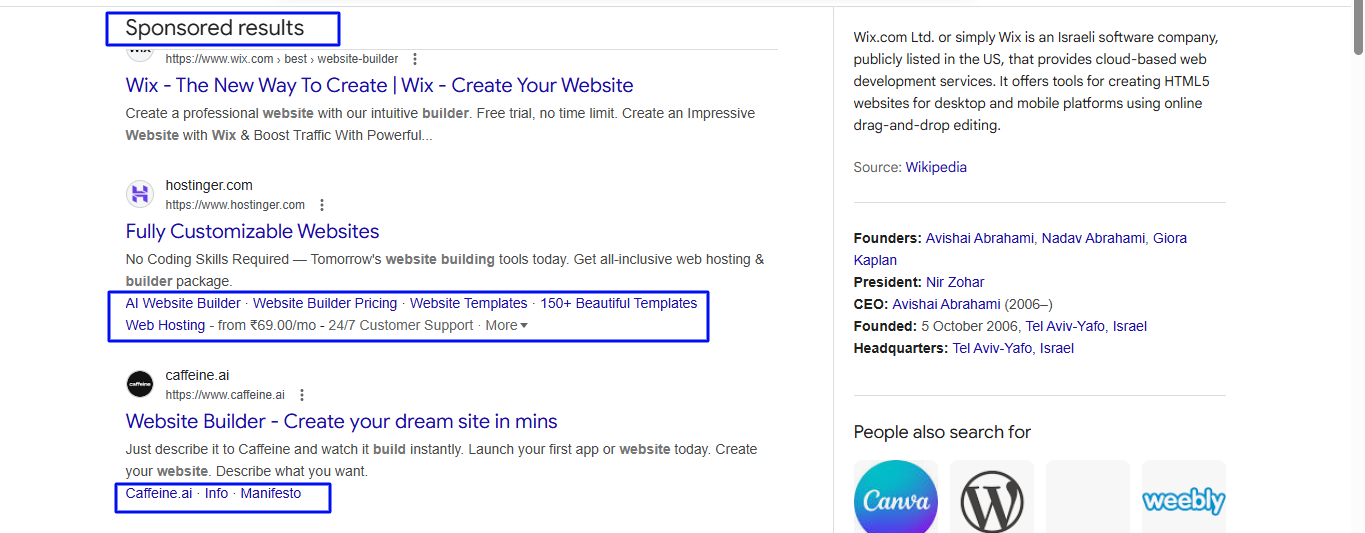
With sitelink extensions, you can add more links below your main ad. There is a different page on your website for each sitelink.
Some common examples are:
- Pricing
- Features
- Case Studies
- Contact Us
- Free Trial
Sitelinks are especially effective for:
- High-intent brand searches
- SaaS and B2B services
- Ecommerce categories
Why they work: They let users self-select their intent instead of forcing everyone through the same landing page.
2. Callout Extensions
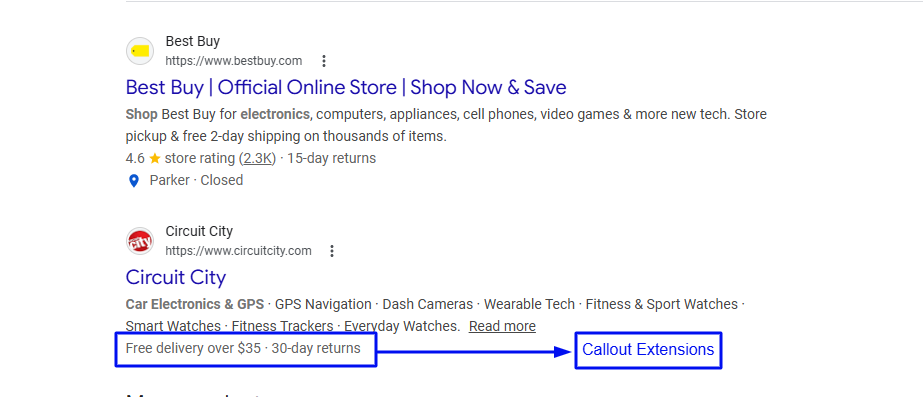
Callout extensions add short phrases that highlight benefits or differences but can't be clicked on.
Examples:
- Free Shipping
- 24/7 Support
- No Credit Card Required
- ISO Certified
- Trusted by 10,000+ Customers
In order to reinforce trust and value without altering the location where the click is made, callouts are an ideal solution.
Best use case: The best use case is when users require reassurance prior to clicking.
3. Structured Snippet Extensions
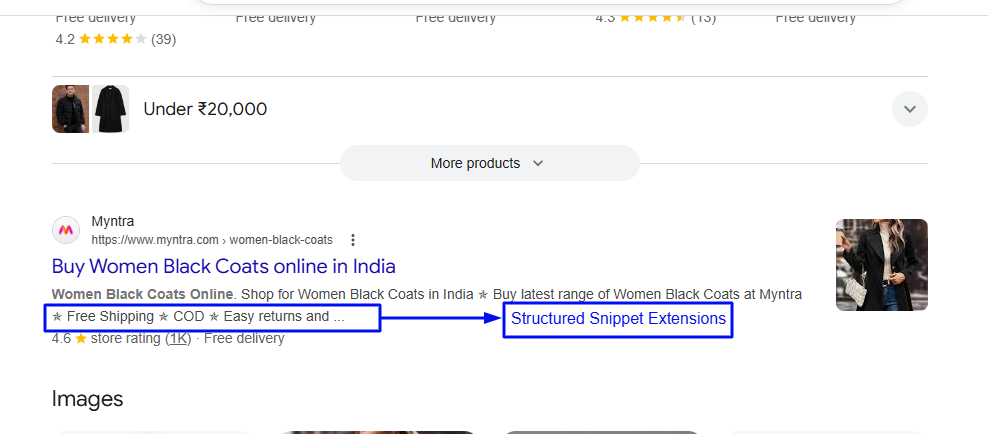
Structured snippets show a header that has already been set up, followed by a list of values.
Common headers include:
- Services
- Features
- Brands
- Destinations
- Types
For instance, services such as SEO, PPC, CRO, and analytics often confuse structured snippets with callouts, but their primary function is classification, not persuasion.
They work best when users are comparing options.
4. Call Extensions
With call extensions, you can put a phone number or call button right in your ad.
They are particularly effective for:
- Local businesses
- High-urgency services
- Sales-led funnels
In mobile-first markets, call extensions often outperform landing page clicks.
For queries that are likely to require immediate contact, Google is increasingly giving priority to call extensions, particularly during business hours.
5. Location Extensions
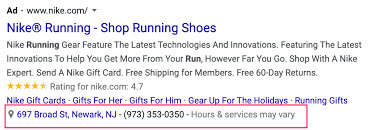
Location extensions display the address of your company, the distance between you and the site, and a map pin.
They’re essential for:
- Retail
- Healthcare
- Restaurants
- Service-area businesses
Location extensions rely on a connected Google Business Profile, making local accuracy critical.
Strategic benefit: They build real-world trust and improve local relevance signals.
6. Price Extensions
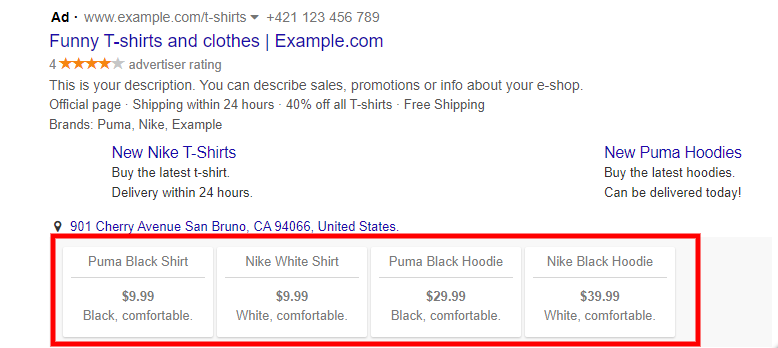
A price extension enables you to display products or services along with their prices directly within the advertisement.
Examples:
- Starter Plan – $29/month
- Consultation – $99
- Premium Package – $499
These extensions pre-qualify clicks by setting expectations upfront.
They are especially useful in competitive markets where price transparency matters.
7. Promotion Extensions
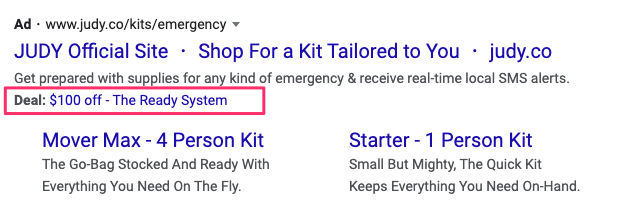
Promotion extensions bring attention to additional discounts or special offers.
Examples:
- 20% Off
- Black Friday Sale
- Free Setup This Month
They can include:
- Discount percentage or amount
- Promotion dates
- Occasion labels (Black Friday, Back to School, etc.)
Best use case: Time-bound campaigns and seasonal demand spikes.
8. Image Extensions
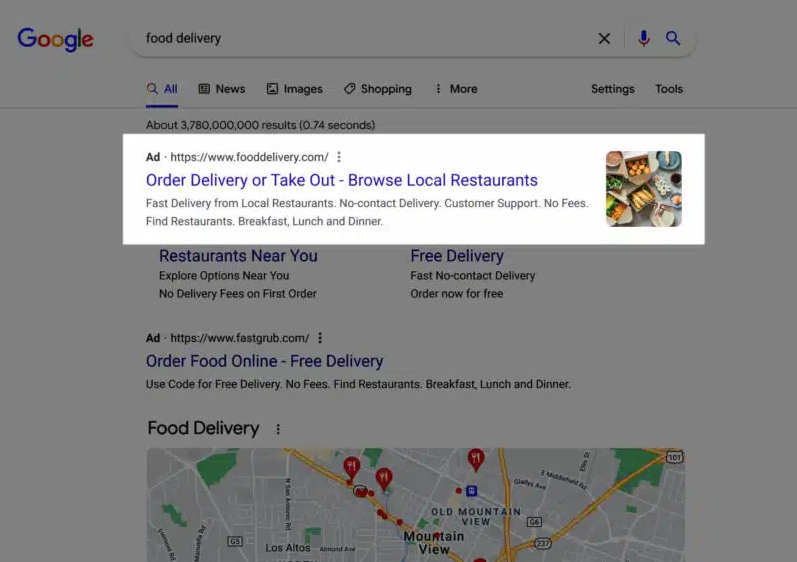
Image extensions allow you to add relevant images alongside your text ad.
The visibility of this format has significantly increased over the course of the past year, particularly on mobile devices.
Image extensions are useful when:
- Visual context improves trust
- Branding matters
- Products benefit from visual clarity
Google now strongly encourages advertisers to add image assets where possible.
9. App Extensions
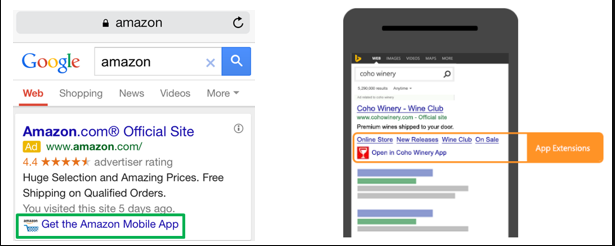
App extensions promote your mobile app directly from the ad, linking users to the App Store or Play Store.
They’re commonly used by:
- Fintech apps
- Consumer SaaS
- Marketplaces
In 2026, app extensions are often paired with deep linking and audience targeting.
10. Lead Form Extensions
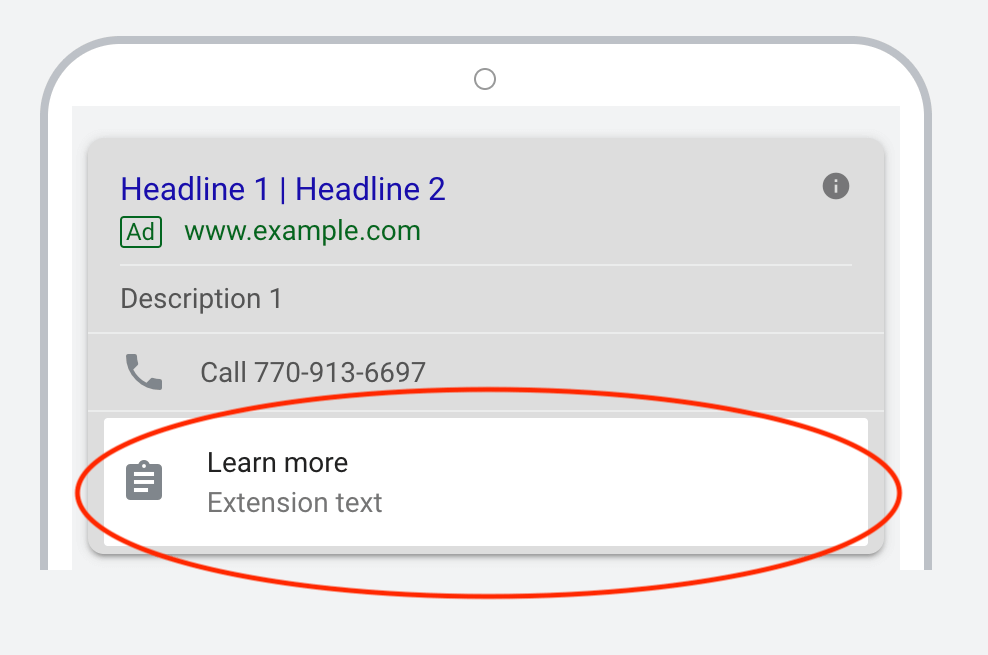
Lead form extensions let users submit their information directly within the ad, without visiting a landing page.
They’re effective for:
- B2B lead generation
- High-intent service queries
- Webinar or demo offers
However, they require careful follow-up systems to avoid lead quality issues.
11. Affiliate Location Extensions
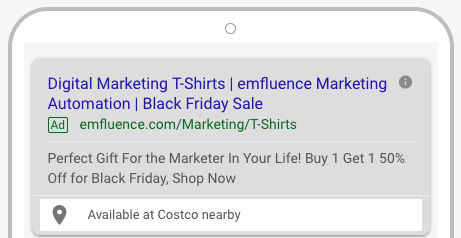
Affiliate location extensions show nearby retail partners that sell your product.
Consumer brands and manufacturers typically use them.
This extension bridges online ads with offline purchase behavior.
12. Automated Extensions
Google also uses automatically created assets, such as:
- Automated sitelinks
- Dynamic callouts
- Seller ratings
These are generated based on landing pages, historical performance, and user behavior.
Key point: Automated extensions can help—but they should not replace a deliberate extension strategy.
Which Google Advertising Extensions Matter Most?
While Google recommends using all relevant extensions, performance data across industries shows that these tend to have the biggest impact:
- Sitelink extensions
- Callout extensions
- Structured snippets
- Call extensions (for service businesses)
- Image extensions
The goal is not to overload the ad but to match extensions to intent.
Google Ads Extensions Examples
When it comes to pricing, features, and case studies, a SaaS brand utilizes sitelinks. Additionally, they highlight the fact that they are "SOC-2 Compliant" and "Trusted by 5,000+ Teams."
A healthcare clinic facility combines call extensions, location extensions, and structured snippets listing treatments.
An e-commerce brand utilizes price and promotion extensions during seasonal sales.
Each example uses extensions to answer questions before the click.
Ad Extension Mistakes to Avoid
Extensions work best when they are intentional, not incidental.
- Using generic callouts that add no value
- Repeating the same message across all extensions
- Linking sitelinks to irrelevant pages
- Forgetting to schedule call extensions by business hours
- Relying entirely on automated extensions
Conclusion
In modern Google Ads, the question is no longer, “Should we use ad extensions?”
The real question is, “Are our ad extensions doing the selling before the click?”
When used correctly, Google ad extensions:
- Increase visibility
- Improve CTR
- Strengthen Quality Score
- Pre-qualify users
- Lower acquisition costs
- They don’t just enhance ads, they define performance.
Not Getting Enough Clicks From Your Google Ads?
Ad extensions can boost CTR by 10–15% when done right. Our team audits, structures, and optimizes Google Ads extensions for visibility, relevance, and conversion without increasing spend.



Your SEO, on autopilot
Saffron OS runs 15+ AI agents that audit your visibility across Google, ChatGPT, Gemini and Perplexity every day — then fix what's broken, automatically. Built over 18 months. Results in 2–15 minutes.
Explore Saffron OSFrequently Asked Questions
What are the extra features of Google Ads?

Google ad extensions are extra parts of ads that give more information, like links, offers, locations, or actions. They help ads get more views and clicks.
Do Google ad extensions make ads work better?
Yes. Google says that relevant ad extensions can boost click-through rates by 10–15% or more, depending on the industry and the intent of the ad.
Does Google show all ad extensions by default?
No. Google selects extensions based on their relevance, ad ranking, user preference, and expected performance. .
Can having too many ad extensions hurt performance?
Poorly written or irrelevant extensions can obscure the message, but not directly. Extensions should always match what people are looking for and what is on the landing page.

Shreya Debnath

Shreya Debnath is a Marketing Manager at Saffron Edge with over 5 years of experience in SEO, AI-driven marketing, growth marketing, and technical SEO. She has hands-on expertise in optimizing existing content, improving performance, and driving scalable growth through data-backed strategies. She has worked with international markets, especially the US and UK, and diverse teams to build effective marketing campaigns, strengthen brand positioning, and enhance audience engagement across multiple channels. Her approach focuses on aligning sales and marketing to ensure consistent and measurable results. Outside of work, Shreya enjoys exploring new cities, pursuing creative hobbies, and discovering unique stories through travel and local experiences.
Related Blogs
We explore and publish the latest & most underrated content before it becomes a trend.

7 min read
The Ultimate Guide to HubSpot Inbox Automation for Enterprises
By Sabah Noor
4 min read
HubSpot Marketing Automation: Beginner to Advance Guide
By Pushpendra Shukla


Subscribe to Saffron Edge Newsletter!


Your SEO, on autopilot
Saffron OS runs 15+ AI agents that audit your visibility across Google, ChatGPT, Gemini and Perplexity every day — then fix what's broken, automatically. Built over 18 months. Results in 2–15 minutes.
Explore Saffron OS