





The Ultimate Guide to Content Hubs


Mar 06, 2026

 11 min


Most brands are publishing more content than ever. New blog posts go live each week. Guides are updated. Landing pages multiply across the site. On the surface, it looks like steady progress.
But the performance data tells a different story.
Large-scale SEO studies show that 96.55% of all pages receive zero organic traffic. Not low traffic. Not underperforming traffic. Zero.
At the same time, modern buyers are consuming more content than ever before they speak with a sales team. The average B2B buyer reviews 11 to 13 pieces of content during the decision process, and about 72% of that research starts online.
The demand for content clearly exists. The problem lies in how most companies produce and organize it. A typical blog grows in a scattered way:
- One post about SEO
- One about analytics
- One product announcement
- One thought piece from leadership
- Another post on a completely different topic
Each article lives on its own. There is no clear relationship between topics, and no strong signal to search engines about what the site truly specializes in.
The environment is also getting tougher.
- Content production costs continue to rise.
- AI search results answer more queries without sending users to websites.
- Google’s Helpful Content updates reduced the visibility of low-quality or unfocused content by about 45%.
Publishing more disconnected articles will not solve this. In many cases, it spreads authority across too many topics and weakens performance even further.
The brands still growing organic traffic are taking a different approach. They are not producing more content.
They are building structured, topic-focused content hubs that guide both search engines and buyers through a clear, connected journey.
Why Does Most Content Fail to Generate Traffic or Leads?
Many brands publish blog posts every week with the hope that more content will lead to more traffic. Each article targets a different keyword, answers a different question, and speaks to a slightly different audience segment.
Over time, the blog grows into a long archive of unrelated posts.
This is why many marketing teams now ask why a content hub is a must-have technology instead of debating whether they should publish more articles. Without a structured hub, content stays disconnected, challenging to navigate, and nearly invisible in search.
#1 Random Posts Create Zero Authority
Search engines reward sites that show depth and consistency around a topic. When a blog jumps between unrelated subjects, those signals never form.
Each post may be useful on its own. Yet none of them work together to build authority around a single topic. The site looks broad but shallow, with no clear center of gravity.
Search engines see scattered topics rather than a focused resource. Rankings stay low because the site never becomes the obvious answer for any one subject. Traffic remains inconsistent, and growth feels unpredictable.
#2 No Internal Linking Means No Rankings
Internal links help search engines understand which pages matter most and how topics connect. They also guide readers from one relevant resource to the next, which increases engagement and trust. Without a clear linking structure:
- Authority does not flow between pages.
- Older posts become isolated.
- Important pages stay buried deep in the site.
- Search engines struggle to interpret topical relationships.
Many blogs publish hundreds of posts with almost no internal linking strategy. Each page tries to rank on its own, which spreads authority thin across the entire site. The result is a large content library that produces very little traffic.
A topic cluster strategy solves this by connecting related pages through deliberate internal links. The hub page becomes the main resource, and supporting articles strengthen it by feeding authority back into the central topic.
#3 No Funnel Logic Means No Conversions
Modern B2B buyers rarely contact sales after reading a single article. They start with educational searches, move to solution-focused content, compare options, and then look for proof such as case studies or playbooks.
If your content does not guide them through that journey, they will assemble it themselves from different websites. Each step they take outside your site increases the chance that a competitor becomes the trusted source. Most blogs lack:
- Awareness-stage guides.
- Consideration-stage comparisons.
- Decision-stage case studies or proof.
A bold content hub strategy connects these stages into a single, logical journey. Readers start with a broad guide, move into deeper articles, and eventually reach high-intent assets that support a purchase decision.
Is your content failing to drive real traffic or leads?
Most blogs stay invisible because their content is scattered. We build structured content hubs that turn isolated posts into authority engines that attract traffic, engage buyers, and generate pipeline.
What Are the Main Types of Content Hubs?
A content hub is not a fixed structure. Different businesses use different hub models based on their goals, audience size, and the complexity of their topics. The right structure depends on how much content you have, how many themes you cover, and how your buyers prefer to learn.
Below are the four most common content hub models used across SaaS, ecommerce, and B2B brands.
#1 Hub and Spoke
This pillar and cluster model centers around one broad topic, supported by multiple cluster pages that cover subtopics in depth.
The pillar page acts as the main guide. It introduces the subject, explains the big ideas, and links to cluster pages for detailed answers. Each cluster page links back to the pillar, forming a connected topic structure. This model works well when:
- You want to build authority around one main subject.
- The topic has many related subtopics.
- Search demand is spread across long-tail queries.
#2 Content Library
A content library hub organizes multiple themes under one central resource center. Instead of focusing on a single topic, it groups content into several categories.
Each category has its own cluster of pages. The main hub page acts as an index that helps users navigate across themes. This model works well when:
- Your brand covers several major subjects.
- You have a large archive of content.
- Users need quick access to specific categories.
Example use:
- An HR resource center with sections for hiring, onboarding, culture, and performance management.
#3 Topic Gateway
A topic gateway hub focuses on deep education around one subject. The main page covers the topic in detail, almost like a complete guide. It then links to supporting articles that explain specific angles. This structure works well for:
- Beginner-friendly education.
- Complex subjects that need step-by-step explanations.
- Brands that want to become the go-to resource for a single topic.
#4 Content Database
A content database hub organizes a large volume of assets that users can filter or search. The main page acts as a directory rather than a traditional pillar. This model works best when:
- You manage hundreds or thousands of entries.
- Users need to search by category, tag, or format.
- The hub functions like a reference tool.
| Type | Best for | Example use |
| Hub and spoke | Single core topic | SaaS SEO hub |
| Content library | Multiple themes | HR resource center |
| Topic gateway | Deep education | Beginner guides |
| Content database | Large catalogs | Glossaries, directories |
How Do You Build a High-Performing content hub?
A high-performing content hub starts with strategy, not publishing speed. A structured content hub strategy follows a clear sequence. Each step connects business goals, search demand, and buyer behavior.
This structured process explains why a content hub is a must-have technology for brands that rely on organic growth. When the hub is built around revenue drivers and buyer journeys, it becomes a long-term traffic and pipeline engine.
Below is a step-by-step approach for building a content hub.
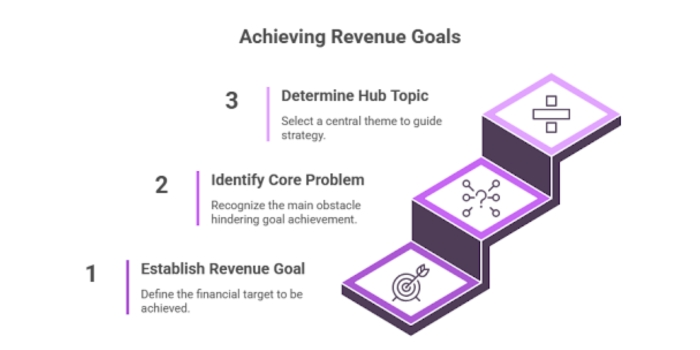
Step 1: How Do You Choose the Right Hub Topic?
The hub topic should come from business priorities, not just keyword tools. Many brands choose topics with search volume but no connection to revenue. That approach attracts traffic but rarely drives leads. A strong hub topic connects three elements:
- A business goal
- A core buyer problem
- A topic with search demand
Start with revenue drivers. Look at:
- High-margin services or products
- Core solution areas
- Strategic growth priorities
Map to buyer problems
Identify the main challenges your ideal customer is trying to solve. The hub topic should sit at the center of that challenge. Validate with search demand
Use keyword research to confirm:
- People are searching for the topic
- There are multiple related subtopics
- The search intent matches your offering
This keeps the hub aligned with both search visibility and pipeline growth.
Step 2: How Do You Map Cluster Topics?
Once the hub topic is set, the next step is building the supporting cluster pages. These pages answer specific questions that relate to the main topic.
#1 Use keyword clusters
Group related keywords around common themes instead of treating each keyword as a separate article.
#2 Group by search intent
Organize clusters by:
- Informational queries.
- Comparison queries.
- Decision-stage queries.
#3 Avoid cannibalization
Each cluster page should:
- Target a distinct subtopic
- Answer a unique question
- Avoid overlapping with other pages
#4 Cluster size guideline:
- Ideal: 20 to 30 clusters per hub.
- Starter model: 10 to 15 clusters.
Step 3: How Do You Audit Existing Content for a Hub?
Many brands already have useful articles scattered across their blog. A Content Audit helps turn those isolated posts into part of a structured hub.
#1 Repurpose before creating
Start by reviewing existing posts that match cluster topics. Update and integrate them into the hub before creating new content.
#2 Merge thin articles
If several posts cover similar ideas:
- Combine them into one stronger article.
- Redirect the old URLs.
- Link the new page to the hub.
#3 Fill topic gaps
After the audit, identify missing subtopics and plan new content to complete the cluster.
One site reported 40% traffic growth in three months by reorganizing existing posts into clusters and improving internal links. No major content production was required.
Step 4: How Do You Structure Internal Links for Maximum SEO Impact?
Internal links turn a group of articles into a real pillar and cluster model. Without these links, the hub remains a loose collection of posts. Core linking structure includes:
- Pillar page links to all cluster pages.
- Each cluster page links back to the pillar.
- Related cluster pages link to each other where relevant.
This creates a clear topical network that search engines can follow. Internal linking experiments have shown 7% to 25% traffic increases for pages that receive new, relevant links. The gains come from better authority flow and clearer topic signals.
Step 5: How Do You Add Conversion Paths Inside a Hub?
Traffic without conversion paths rarely drives revenue. A strong content hub architecture connects educational content with decision-stage assets.
#1 Contextual CTAs
Place calls to action inside articles where they feel natural. The offer should match the reader’s intent.
#2 Lead magnets per cluster
Each cluster can have its own asset, such as:
- Checklists.
- Templates.
- Short guides.
- Industry reports.
#3 Decision-stage assets
Surface high-intent content within the hub:
- Case studies
- Comparison pages
- Playbooks
- Product walkthroughs
When these assets appear inside the same hub, readers move from education to decision without leaving your site.
Publishing more content but seeing no results?
At Saffron Edge, we turn disconnected articles into revenue-focused content hub strategies that build authority, improve rankings, and guide buyers toward conversion.
What Are the Most Common content hub Mistakes to Avoid?
A high-performing hub requires structure, depth, clarity, and a clear connection to the buyer journey. When those elements are missing, the hub turns into another collection of disconnected articles. This is often the turning point where teams begin to understand why a content hub is a must-have technology, only when it is built with the right strategy.
Below are the most common mistakes that limit traffic, authority, and conversions.
#1 Publishing Without a Hub Strategy
Some teams start writing cluster articles before defining the main pillar or the overall topic. This approach leads to:
- Overlapping topics.
- Weak authority signals.
- Confusing user journeys.
#2 Too Few Clusters
A pillar page supported by only three or four articles rarely builds enough authority to compete in search. Search engines look for consistent coverage across a topic. Buyers also expect to find answers to multiple related questions in one place. A strong topic cluster usually includes:
- 10 to 15 cluster pages in the early stage.
- 20 to 30 clusters for a mature hub.
#3 No Funnel Content
Some hubs focus only on educational articles. They explain problems and concepts, but never guide readers toward a decision.
This creates a gap between traffic and revenue. Visitors learn from your site, then leave to compare vendors elsewhere. A complete content hub architecture includes:
- Awareness content that explains the problem.
- Consideration of content that compares solutions.
- Decision-stage content, such as case studies or demos.
#4 Weak Internal Linking
Internal links form the backbone of a pillar and cluster model. Without them, the hub remains a loose set of pages. Common linking mistakes include:
- Pillar pages that do not link to all clusters.
- Cluster pages that do not link back to the pillar.
- No links between related cluster topics.
#5 No Conversion Assets
Some hubs attract traffic but fail to capture leads. They provide information but offer no clear next step. This usually happens when:
- There are no lead magnets
- CTAs are generic or irrelevant
- Decision-stage assets are missing
Buyers rarely convert after reading a single article. They need proof, comparison, and practical resources. Effective hubs surface:
- Case studies
- Playbooks
- Templates
- Product comparisons
Closing Thoughts
The real shift in modern SEO is not about writing more articles. It is about owning a topic in a way that search engines and buyers can clearly recognize.
Search is moving toward fewer clicks and deeper evaluation. Buyers arrive with more context, more questions, and higher expectations. They are not looking for one article. They are looking for a place that can guide them through the entire decision process.
A content hub answers that need. It gives your brand a defined area of authority where every page supports a larger story. Instead of chasing isolated keywords, you build a body of work around the problems your buyers actually care about.
This is the deeper reason why a content hub is a must-have technology. It shifts content from a publishing activity into a strategic asset. The hub becomes the place where buyers learn, compare, and build trust. It also becomes the structure search engines rely on to understand your expertise.
The strongest gains come from this shift in positioning:
- Traffic grows because authority compounds across the topic.
- Conversions rise because buyers find decision-stage content in context.
- Lead quality improves because visitors follow a guided journey.
Over time, the hub stops behaving like a blog section. It becomes a destination that buyers return to when they want answers. That is the point where content stops being an expense and starts acting like a growth engine.



Your SEO, on autopilot
Saffron OS runs 15+ AI agents that audit your visibility across Google, ChatGPT, Gemini and Perplexity every day — then fix what's broken, automatically. Built over 18 months. Results in 2–15 minutes.
Explore Saffron OSFAQs
How is a content hub different from a traditional blog?

A traditional blog usually publishes articles in reverse chronological order across many unrelated topics. A content hub groups related pages around one core subject, connects them with internal links, and guides readers through a structured learning path.
Do content hubs work for small businesses or only large companies?
Content hubs work for businesses of any size. Smaller companies often see faster results because they can focus on a narrow, high-intent topic instead of spreading content across many areas. A focused topic cluster can build authority quickly and compete with larger sites.
How many content hubs should a company have?
Most companies start with one high-priority hub tied to a core revenue area. As authority grows, they expand into additional hubs. Many B2B brands operate with three to five major hubs, each aligned with a primary product, service, or customer segment.
Can a content hub include video, tools, or interactive assets?
Yes. A strong hub often includes multiple formats such as videos, calculators, templates, case studies, and comparison pages. These assets increase engagement and help buyers move from awareness to decision within the same topic environment.

Shreya Debnath

Shreya Debnath is a Marketing Manager at Saffron Edge with over 5 years of experience in SEO, AI-driven marketing, growth marketing, and technical SEO. She has hands-on expertise in optimizing existing content, improving performance, and driving scalable growth through data-backed strategies. She has worked with international markets, especially the US and UK, and diverse teams to build effective marketing campaigns, strengthen brand positioning, and enhance audience engagement across multiple channels. Her approach focuses on aligning sales and marketing to ensure consistent and measurable results. Outside of work, Shreya enjoys exploring new cities, pursuing creative hobbies, and discovering unique stories through travel and local experiences.
Related Blogs
We explore and publish the latest & most underrated content before it becomes a trend.

7 min read
What is SEO Semantic Markup and How to Make Your HTML SEO-Friendly?
By Vibhu Satpaul



Subscribe to Saffron Edge Newsletter!


Your SEO, on autopilot
Saffron OS runs 15+ AI agents that audit your visibility across Google, ChatGPT, Gemini and Perplexity every day — then fix what's broken, automatically. Built over 18 months. Results in 2–15 minutes.
Explore Saffron OS